
TheRetroArcade
Veteran
Posts: 9,882
Joined: Feb 2026
Joined: Feb 2026
It's definitely got plenty of parts to pick from, but does it all come together?
When you purchase through links on our site, we may earn an affiliate commission. Here’s how it works.
This month I've been: veering between cable management heaven and hell with the Corsair Frame 4000X. The highly customisable PC case itself is lovely, but the thick braided cables I was limited to using became my nemesis.
The observation that building a PC enjoys a similar appeal to clicking Lego bricks together is far from an original thought; when handed a big ol' box of PC case faceplates, side panels, and internal brackets, few could resist having a play. So, when I was left unattended with a box o' bits for the Corsair Frame 4000X, I set to work on building my dream PC case.
First, it's worth noting that a lot of the parts I'm about to talk about are compatible with the Corsair Frame 4000D PC case our Jacob reviewed. Second, let's talk about the all-important aesthetics: there's a range of options for faceplates and, as they're largely tool-free, you can swap them out to your heart's content. However, the RGB Flow front panel features an additional cable that you'll need to feed behind the modular front panel I/O every time.
View Original
View Original
View Original
View Original
View Original
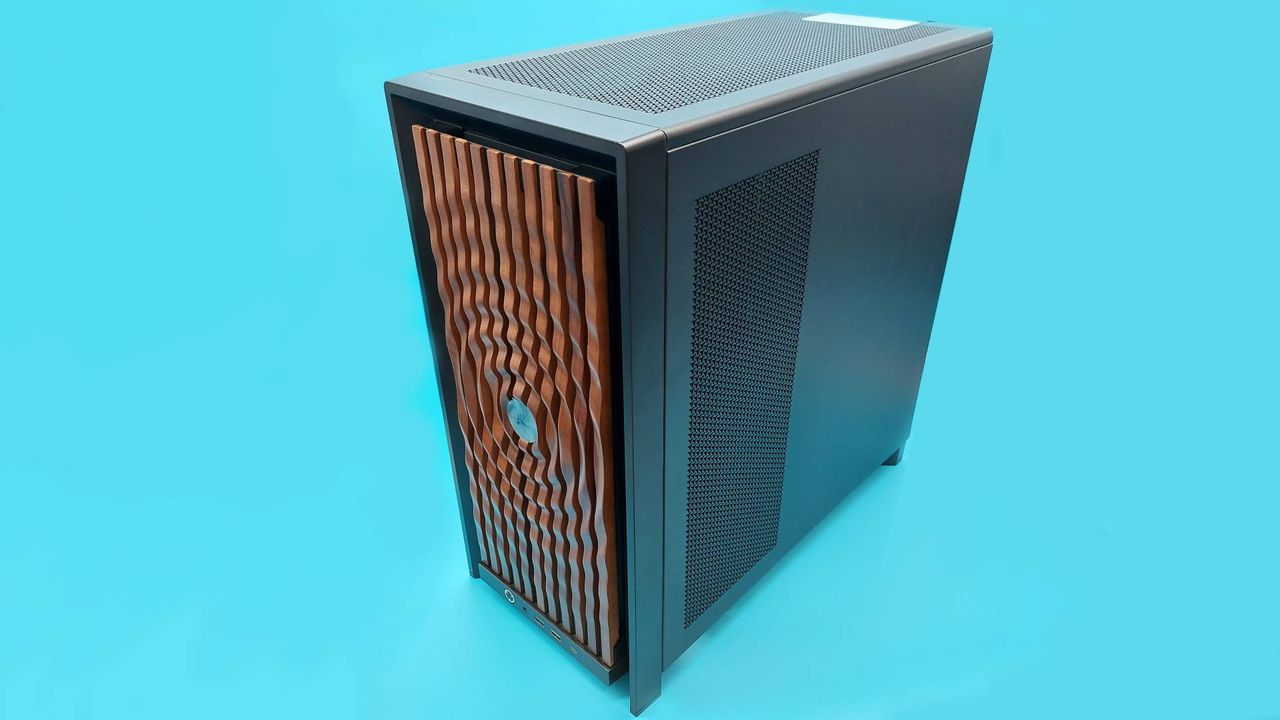
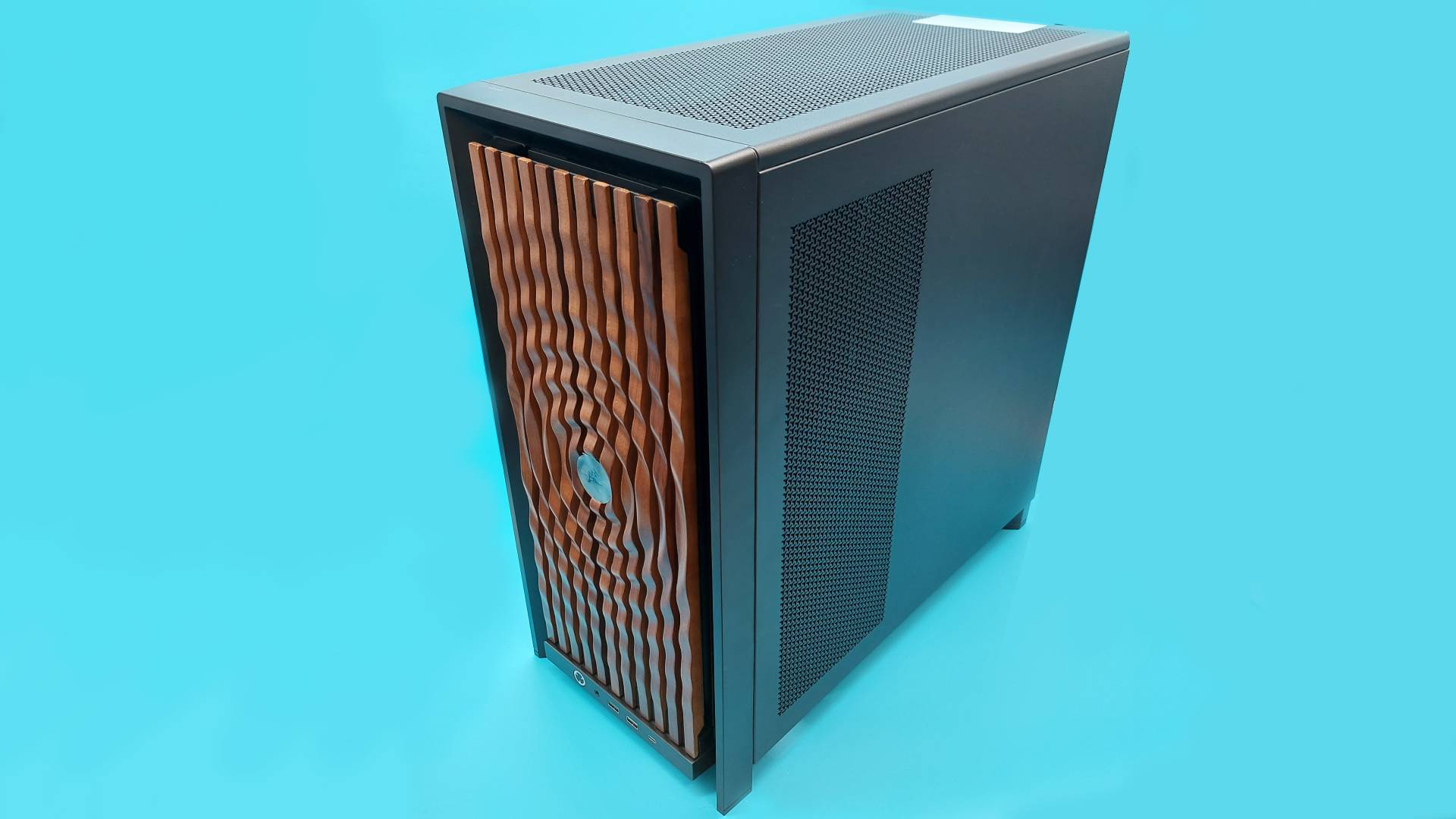
The faff of threading this wire behind the I/O module, plus the fact I thought the RGB Flow looks a bit like a Cylon, meant I swapped it out for some tasteful wood panelling pretty sharpish. Mounting the radiator in the front of the case also meant I wasn't going to get the most out of the 4000X's full glass front panel, or 'pixel glass' face plate either.
I aimed to build something that was business in the front, with the dark walnut face plate, and something of a party in the back, with at least some of my many Miku Hatsune figurines. To be honest, "But where will Miku sit?" dictates a number of my PC building decisions, and this build was no different. For example, internally you can choose between a full-size PSU shroud, or a compact version that proved the perfect perch for Miss Hatsune.
To rewind a bit, let's talk about that modular I/O front panel. You can customise this and entirely swap it out. The MX-style green mechanical switch under the power button can be replaced for something more to your liking, and you've got a choice between a front panel with an audio jack, two USB Type-A ports, and one USB Type-C port—or an I/O module with only USB Type-C ports. I'm an old head, so I held on to my USB-A front ports.
Returning to the bigger picture, both the front and side panels can also be swapped out to dramatically change the look of the case too. Unlike the face plate, these aren't completely tool free panels. Instead, the top and side panels are held in place with a number of thumb screws. That's a fine compromise that balances both a secure attachment with easy-enough-detachment, though I do miss being able to pop off panels like I can on my Hyte Y40 at home.
But while we're on the subject of disassembling this customisable PC case, allow me one complaint: I hate reading digital manuals. My big box o' bits came with many smaller boxes, one of which featured a QR code on the underside of the lid. This takes you to a clearly labelled, nicely laid-out digital manual that I still hated scrolling through on my phone.
Keep up to date with the most important stories and the best deals, as picked by the PC Gamer team.
The rub is this: to check my understanding, it's way easier to flip back and forth through a physical booklet rather than scrolling up and down on a screen. Also, if I lose the physical manual, then that's my own fault—but if the digital manual disappears one day, that's out of my hands in every sense.
You could opt for a flat steel side panel, thereby rendering your PC yet another boring black (or white) box, but where's the fun in that?

Anyway, manual gripes aside, the side panels also only come in black and white, m...Read more: Full article on www.pcgamer.com
What do you think about this?
When you purchase through links on our site, we may earn an affiliate commission. Here’s how it works.
This month I've been: veering between cable management heaven and hell with the Corsair Frame 4000X. The highly customisable PC case itself is lovely, but the thick braided cables I was limited to using became my nemesis.
The observation that building a PC enjoys a similar appeal to clicking Lego bricks together is far from an original thought; when handed a big ol' box of PC case faceplates, side panels, and internal brackets, few could resist having a play. So, when I was left unattended with a box o' bits for the Corsair Frame 4000X, I set to work on building my dream PC case.
First, it's worth noting that a lot of the parts I'm about to talk about are compatible with the Corsair Frame 4000D PC case our Jacob reviewed. Second, let's talk about the all-important aesthetics: there's a range of options for faceplates and, as they're largely tool-free, you can swap them out to your heart's content. However, the RGB Flow front panel features an additional cable that you'll need to feed behind the modular front panel I/O every time.
View Original
View Original
View Original
View Original
View Original
The faff of threading this wire behind the I/O module, plus the fact I thought the RGB Flow looks a bit like a Cylon, meant I swapped it out for some tasteful wood panelling pretty sharpish. Mounting the radiator in the front of the case also meant I wasn't going to get the most out of the 4000X's full glass front panel, or 'pixel glass' face plate either.
I aimed to build something that was business in the front, with the dark walnut face plate, and something of a party in the back, with at least some of my many Miku Hatsune figurines. To be honest, "But where will Miku sit?" dictates a number of my PC building decisions, and this build was no different. For example, internally you can choose between a full-size PSU shroud, or a compact version that proved the perfect perch for Miss Hatsune.
To rewind a bit, let's talk about that modular I/O front panel. You can customise this and entirely swap it out. The MX-style green mechanical switch under the power button can be replaced for something more to your liking, and you've got a choice between a front panel with an audio jack, two USB Type-A ports, and one USB Type-C port—or an I/O module with only USB Type-C ports. I'm an old head, so I held on to my USB-A front ports.
Returning to the bigger picture, both the front and side panels can also be swapped out to dramatically change the look of the case too. Unlike the face plate, these aren't completely tool free panels. Instead, the top and side panels are held in place with a number of thumb screws. That's a fine compromise that balances both a secure attachment with easy-enough-detachment, though I do miss being able to pop off panels like I can on my Hyte Y40 at home.
But while we're on the subject of disassembling this customisable PC case, allow me one complaint: I hate reading digital manuals. My big box o' bits came with many smaller boxes, one of which featured a QR code on the underside of the lid. This takes you to a clearly labelled, nicely laid-out digital manual that I still hated scrolling through on my phone.
Keep up to date with the most important stories and the best deals, as picked by the PC Gamer team.
The rub is this: to check my understanding, it's way easier to flip back and forth through a physical booklet rather than scrolling up and down on a screen. Also, if I lose the physical manual, then that's my own fault—but if the digital manual disappears one day, that's out of my hands in every sense.
You could opt for a flat steel side panel, thereby rendering your PC yet another boring black (or white) box, but where's the fun in that?
Anyway, manual gripes aside, the side panels also only come in black and white, m...Read more: Full article on www.pcgamer.com
What do you think about this?