
TheRetroArcade
Veteran
Posts: 10,105
Joined: Feb 2026
Joined: Feb 2026
And here's how I did it.
When you purchase through links on our site, we may earn an affiliate commission. Here’s how it works.
Ever since the Control mod appeared I've been enjoying jamming the released DLSS 5 .dll files into a bunch of different games, to greater or lesser effect. Some games it works well in, some it doesn't quite take and you end up with visuals that look a lot like the characters have worms writhing around under their skin.
Though, I have to say when I stuck it into the review version of The Blood of Dawnwalker and it failed to hook the DLSS pipeline that look kinda worked for my semi-Vrakhiri. Bit of extra undead chic with the game failing to run the DLSS neural rendering feature with actual motion vectors or scene depth.
With the necessary files being released in the early access version of NBA 2K27, they've now been unleashed across the internet and modders have been busy getting game-agnostic versions ready for people to squeeze into any title they fancy. And while the first iteration was focused on Control and then games running DLSS already, there have been mods released—particularly the RenoDX and specifically the ShortFuse mods—which allow you to experiment with pushing DLSS 5 into practically any game you like.
And it's surprisingly easy to do, though not without its awkwardness, too. Well, such is the way with unreleased features shoehorned into games they're not meant to be in, but also such is the way with PC gaming.
The thing that has stood out to me—and something that Andy first noted in his hands-on look at the official technology at Gamescom—is that DLSS 5 really can produce some outstanding visual effects… if used sparingly. Pick the right model of the three (for me, that's Model C) and drop the intensity of the effect down to around 60 - 70% and you end up with scenes and character models that look better than the originals, but without the over-saturated, overblown very AI look of it dialed up to 11, nor without it looking like it's grinding away or adding its own geometry.
But it's also clear it's one hell of a resource hog. Nvidia has been very clear about this from its recent presentations at Gamescom and a briefing I had at the end of last week; DLSS 5 represents about a 50 - 60% drop in frame rate regardless of the game. Though, sometimes we've seen that performance hit be even greater, especially at 4K.
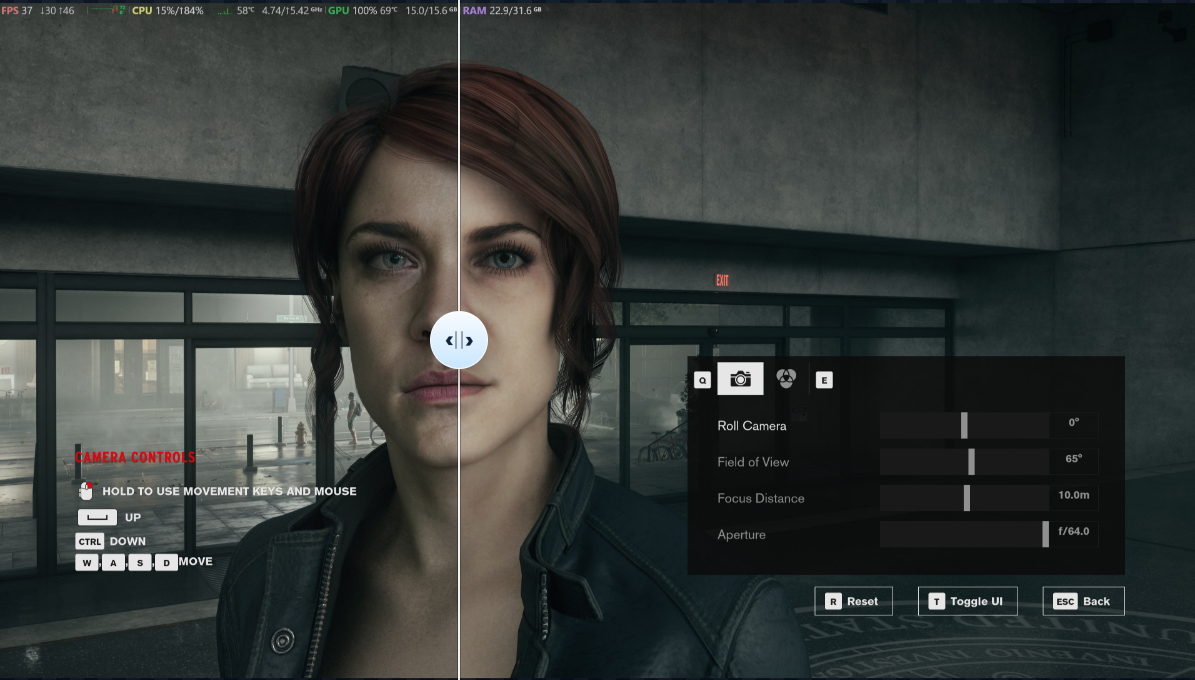
Running the Control mod on an RTX 5090 I was seeing DLSS Balanced 4K Ultra Ray Tracing running at around 110 fps in standard mode, which then dropped to under 50 fps as soon as DLSS 5 was brought to bear on the game, which is about where Nvidia is pitching the performance hit.
The PC Gamer Circuit Breaker newsletter breaks down the latest PC gaming tech, and finds you the best deals on the best products
That, in all honesty, is to be expected. When Nvidia first showed off the tech around GDC it was running on a pair of RTX 5090s, so the fact that it can be run at all on single lower-spec GPUs is impressive. But it was also going to be punitive for current generation hardware, which only have tensor cores enough for standard DLSS upscaling.
Okay, it's not photorealism, but I think it looks better.
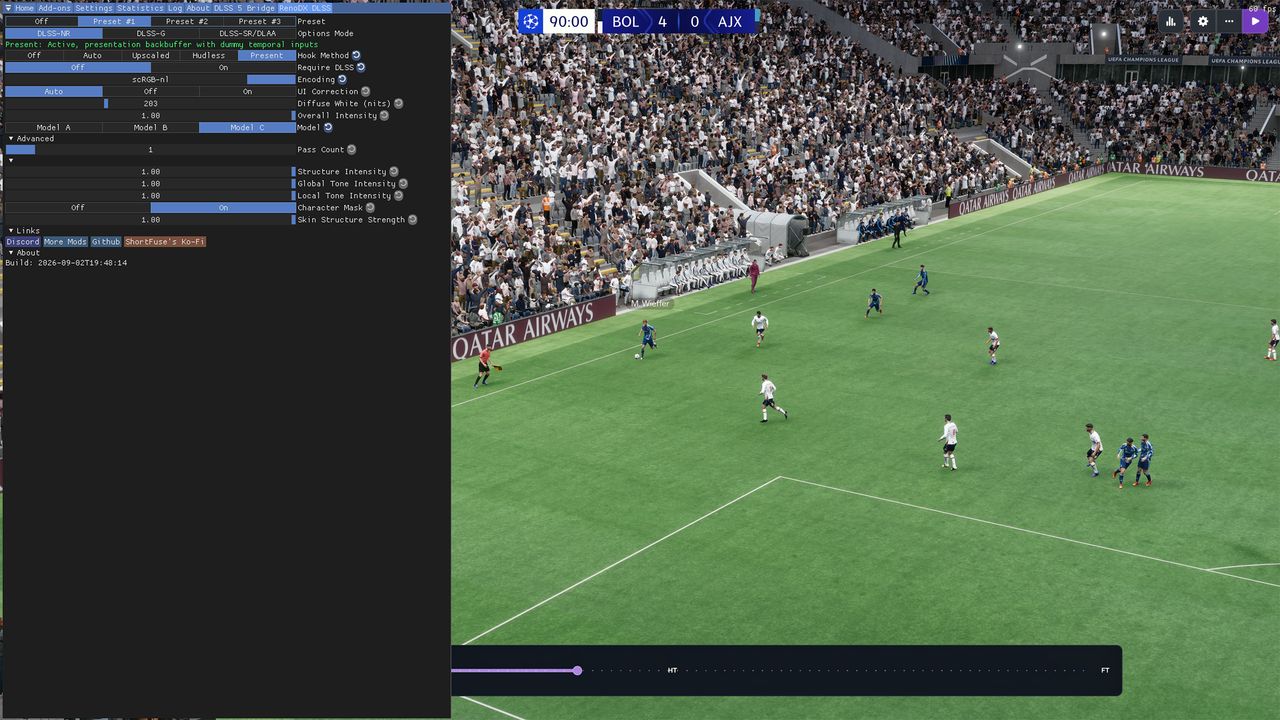
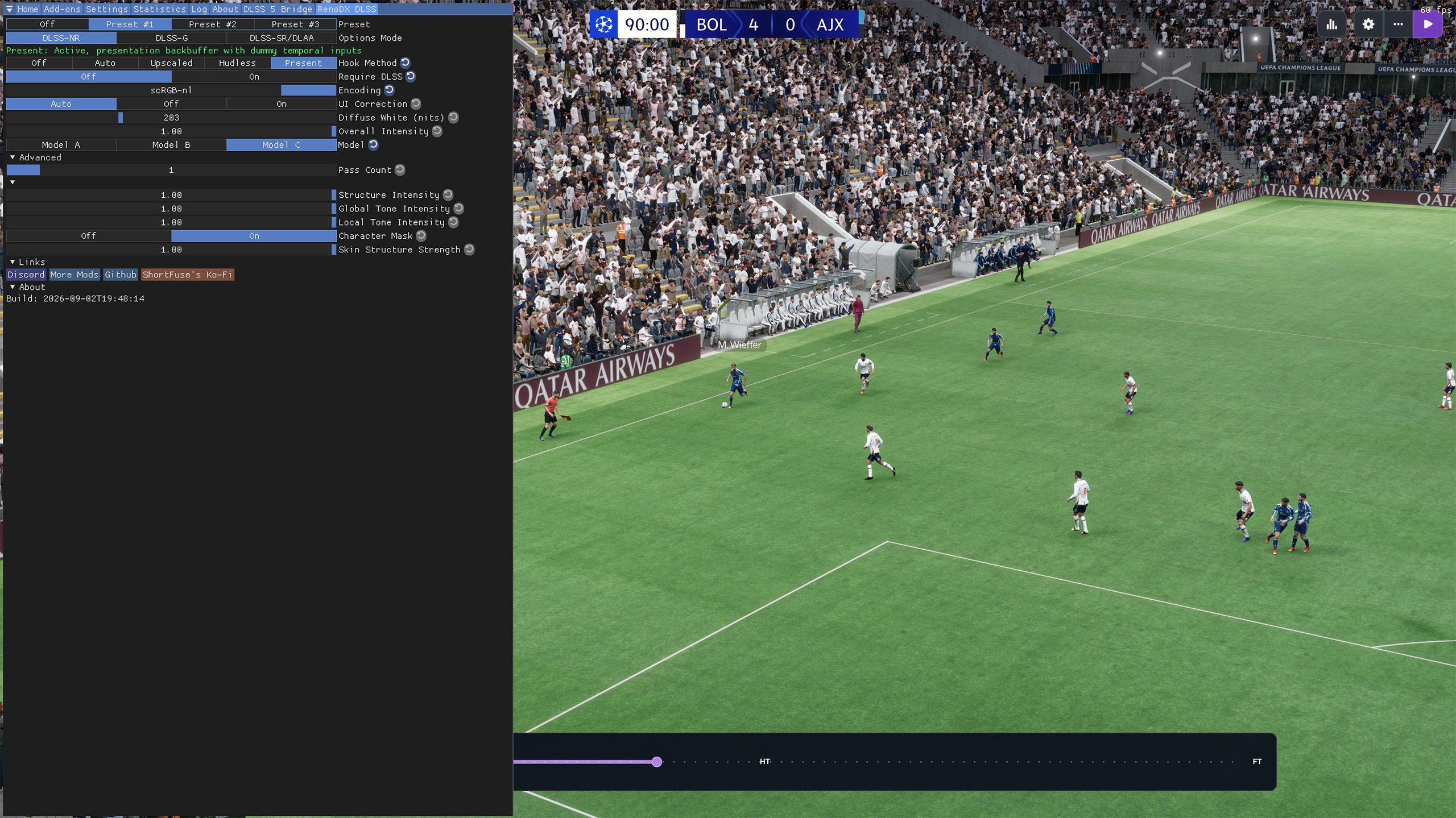
What I wasn't expecting, though, was to be able to stick DLSS 5 into any game, regardless of whether it had DLSS in there in the first place. Which meant that I, with my 33 year Football Manager addiction, had to see what it does to FM26.
And, well, I'm going to be leaving it enabled. It's not that it suddenly makes the game look photorealistic—as Nvidia itself has said, you need a really good input source to get a really good output from DLSS 5—but on its own it adds in a bunch of things that you otherwise have to mod in yourself from a bunch of other places. And because it's just added in last, and FM isn't hugely demanding, I'm still happily locked to 60 fps anyways.
Those little computer people don't need a whole lot of processing.
But it does improve the environmental li...Read more: Full article on www.pcgamer.com
What do you think about this?
When you purchase through links on our site, we may earn an affiliate commission. Here’s how it works.
Ever since the Control mod appeared I've been enjoying jamming the released DLSS 5 .dll files into a bunch of different games, to greater or lesser effect. Some games it works well in, some it doesn't quite take and you end up with visuals that look a lot like the characters have worms writhing around under their skin.
Though, I have to say when I stuck it into the review version of The Blood of Dawnwalker and it failed to hook the DLSS pipeline that look kinda worked for my semi-Vrakhiri. Bit of extra undead chic with the game failing to run the DLSS neural rendering feature with actual motion vectors or scene depth.
With the necessary files being released in the early access version of NBA 2K27, they've now been unleashed across the internet and modders have been busy getting game-agnostic versions ready for people to squeeze into any title they fancy. And while the first iteration was focused on Control and then games running DLSS already, there have been mods released—particularly the RenoDX and specifically the ShortFuse mods—which allow you to experiment with pushing DLSS 5 into practically any game you like.
And it's surprisingly easy to do, though not without its awkwardness, too. Well, such is the way with unreleased features shoehorned into games they're not meant to be in, but also such is the way with PC gaming.
The thing that has stood out to me—and something that Andy first noted in his hands-on look at the official technology at Gamescom—is that DLSS 5 really can produce some outstanding visual effects… if used sparingly. Pick the right model of the three (for me, that's Model C) and drop the intensity of the effect down to around 60 - 70% and you end up with scenes and character models that look better than the originals, but without the over-saturated, overblown very AI look of it dialed up to 11, nor without it looking like it's grinding away or adding its own geometry.
But it's also clear it's one hell of a resource hog. Nvidia has been very clear about this from its recent presentations at Gamescom and a briefing I had at the end of last week; DLSS 5 represents about a 50 - 60% drop in frame rate regardless of the game. Though, sometimes we've seen that performance hit be even greater, especially at 4K.
Running the Control mod on an RTX 5090 I was seeing DLSS Balanced 4K Ultra Ray Tracing running at around 110 fps in standard mode, which then dropped to under 50 fps as soon as DLSS 5 was brought to bear on the game, which is about where Nvidia is pitching the performance hit.
The PC Gamer Circuit Breaker newsletter breaks down the latest PC gaming tech, and finds you the best deals on the best products
That, in all honesty, is to be expected. When Nvidia first showed off the tech around GDC it was running on a pair of RTX 5090s, so the fact that it can be run at all on single lower-spec GPUs is impressive. But it was also going to be punitive for current generation hardware, which only have tensor cores enough for standard DLSS upscaling.
Okay, it's not photorealism, but I think it looks better.
What I wasn't expecting, though, was to be able to stick DLSS 5 into any game, regardless of whether it had DLSS in there in the first place. Which meant that I, with my 33 year Football Manager addiction, had to see what it does to FM26.
And, well, I'm going to be leaving it enabled. It's not that it suddenly makes the game look photorealistic—as Nvidia itself has said, you need a really good input source to get a really good output from DLSS 5—but on its own it adds in a bunch of things that you otherwise have to mod in yourself from a bunch of other places. And because it's just added in last, and FM isn't hugely demanding, I'm still happily locked to 60 fps anyways.
Those little computer people don't need a whole lot of processing.
But it does improve the environmental li...Read more: Full article on www.pcgamer.com
What do you think about this?